Compute OHCL from Tick Data with Google BigQuery
Pre-reqs to follow this tutorial
- Know what’s gcloud bucket and how to copy files to it
- Have
gcloudtool configured on local - Know how to use Python
- Know how to use bash
Getting data
Finnhub provides tick level data for TSX for couple of years that you can bulk download from 2021 up to last month.
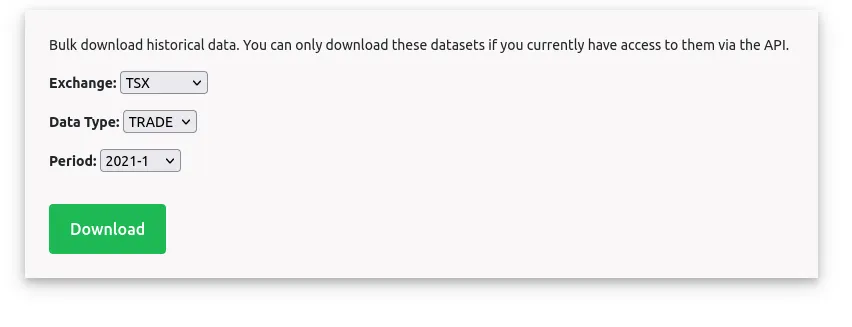
You can download each one separately or use the script below to get everything
#!/bin/bash

TOKEN="YOUR_TOKEN"
DIR_NAME="./finnhub_data/"

for year in {2021..2023}; do
    for month in {1..12}; do
        # Get the redirect URL
        REDIRECT_URL=$(curl -s "https://finnhub.io/api/v1/bulk-download?exchange=to&dataType=trade&year=$year&month=$month&token=$TOKEN" | grep -oE 'href="[^"]+"' | cut -d'"' -f2)
        mkdir -p "$DIR_NAME"
        # Follow the redirect if a URL was found
        if [[ ! -z "$REDIRECT_URL" ]]; then
            curl -o "to_trade_$year-$month.tar" "$REDIRECT_URL"
            mv "to_trade_$year-$month.tar" $DIR_NAME
        fi

        sleep 1
    done
done
# Copy paste the code into file, say fetch_finnhub_archive.sh
chmod +x fetch_finnhub_archive.sh
./fetch_finnhub_archive.sh
Once you are done, you will end up with 94GB of files. Now let’s say you want to convert this to 1-min OHCL data. You can use pandas and do the processing, or you can use Google BigQuery to do that.
Compute OHCL with Google BigQuery
- Untar files
- You will end up with many small files that you can compress into bigger files
- Upload bigger files to Google Bucket
- Import files into BigQuery table
- Compute OHCL from it and store results in a separate table
- Export the ohcl table into Google Bucket
- Download result to your local
- Costs
Untar all of your tick archives
#!/bin/bash
for file in $1/*.tar; do
    # Extract the tar file into the directory
    echo "Extracting $file to $dir_name..."
    dir_name="./uncompressed/${file##*/}"
    mkdir -p $dir_name
    tar -xf "$file" -C "$dir_name"
done
# Copy and paste into a script called uncompress_finnhub_archive.sh
chmod +x uncompress_finnhub_archive.sh
./uncompress_finnhub_archive.sh ./finnhub_data
After you run this script and cd uncompressed/to_trade_2021-1 and run ls -hl. You will see something like this.
total 2.5M
drwx------ 2 user user 124K Jan  5  2021 2021-01-04
drwx------ 2 user user 120K Jan  5  2021 2021-01-05
drwx------ 2 user user 124K Jan  6  2021 2021-01-06
drwx------ 2 user user 116K Jan  7  2021 2021-01-07
drwx------ 2 user user 128K Jan  8  2021 2021-01-08
drwx------ 2 user user 128K Jan 12  2021 2021-01-11
drwx------ 2 user user 124K Jan 13  2021 2021-01-12
drwx------ 2 user user 124K Jan 14  2021 2021-01-13
drwx------ 2 user user 124K Jan 15  2021 2021-01-14
drwx------ 2 user user 124K Jan 15  2021 2021-01-15
drwx------ 2 user user 120K Jan 19  2021 2021-01-18
drwx------ 2 user user 120K Jan 19  2021 2021-01-19
drwx------ 2 user user 124K Jan 20  2021 2021-01-20
drwx------ 2 user user 120K Jan 21  2021 2021-01-21
drwx------ 2 user user 124K Jan 23  2021 2021-01-22
drwx------ 2 user user 128K Jan 26  2021 2021-01-25
drwx------ 2 user user 124K Jan 27  2021 2021-01-26
drwx------ 2 user user 124K Jan 27  2021 2021-01-27
drwx------ 2 user user 124K Jan 28  2021 2021-01-28
drwx------ 2 user user 124K Jan 31  2021 2021-01-29
How many files are there in total and what’s their average size?
find "uncompressed" -type f | wc -l
2490838
find "uncompressed" -type f -exec du -k {} + | awk '{sum += $1} END {print sum}'
12081404

❯ python3
>>> 12081404 / 2490838
4.85033711546074 # Kbs
- What we see is that we have lots of small files, and it will take lots of time to upload each one separately to Google Cloud bucket for further processing.
- Instead let’s collate those together into larger
.csvfiles
To do this, let’s use the script below. Note, you need to install pandas and tqdm libraries.
import os
import pandas as pd
from tqdm import tqdm

for dir in tqdm(os.listdir("./uncompressed"), desc="Processing months"):
    try:
        for file in tqdm(os.listdir(f"./uncompressed/{dir}"), desc="Processing days"):
            tables = []
            file_name = f"./transformed/transformed_{dir}_{file}.csv"
            if os.path.exists(file_name):
                pass
            for asset in os.listdir(f"./uncompressed/{dir}/{file}"):
                symbol = asset.split(".csv.gz")[0]
                df = pd.read_csv(f"./uncompressed/{dir}/{file}/{asset}", compression='gzip')
                df["symbol"] = symbol
                tables.append(df)

            df = pd.concat(tables)
            os.makedirs("./transformed", exist_ok=True)
            df.to_csv(file_name)
    except Exception as e:
        print(e)
        print("Skipping")
So how many files do we have now?
find "transformed" -type f | wc -l
 749
As you can see, we have fewer files and those files are much bigger. Now, it’s more manageable to load everything into Google bucket and process it with BigQuery.
At this point, you are going to have to upload multiple files to a bucket from local by using the following:
gsutil -m cp -r transformed gs://your-bucket-datalake/finnhub_transformed
Depending on your upload speed, it might take some time to upload. You can do all of the above steps on Google Compute, and the upload speed from Google Compute to Google Bucket will not be an issue.
Import files into BigQuery
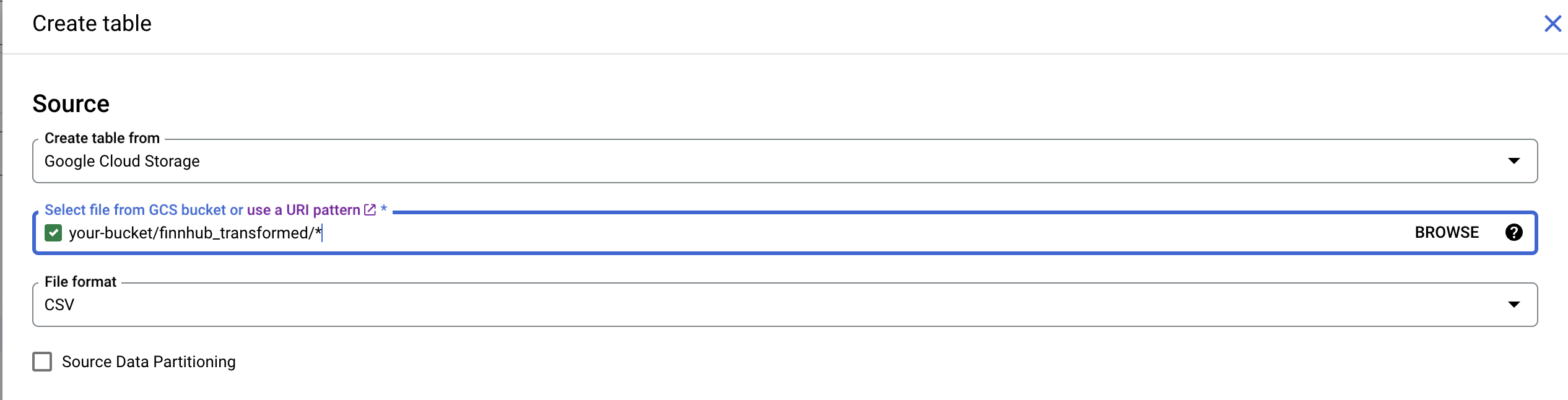
- Create a dataset in BigQuery
- Create a table and specify path to a location on Google Storage bucket that contains all of the uncompressed files:
my-bucket-names/finnhub_transformed/* - Don’t forget to enable
Schema Auto Detect
Compute OHCL from it and store results in a separate table
Now that our data is within the BigQuery table, we can use BigQuery SQL to compute OHCL.
CREATE TABLE trade_data.one_minute_ohcl AS

WITH MinuteRounded AS (
  -- This subquery rounds timestamps to the nearest minute
  SELECT
    TIMESTAMP_TRUNC(TIMESTAMP_MILLIS(timestamp), MINUTE) AS minute_timestamp,
    symbol,
    price,
    volume,
    timestamp  -- Include the raw timestamp
  FROM
    trade_data.tick_data
),

AggregatedData AS (
  SELECT
    minute_timestamp,
    symbol,
    FIRST_VALUE(price) OVER w AS open,
    MAX(price) OVER w AS high,
    MIN(price) OVER w AS low,
    LAST_VALUE(price) OVER w AS close,
    SUM(volume) OVER w AS volume
  FROM
    MinuteRounded
  WINDOW w AS (
    PARTITION BY symbol, minute_timestamp
    ORDER BY timestamp
    ROWS BETWEEN UNBOUNDED PRECEDING AND UNBOUNDED FOLLOWING
  )
)

SELECT
  minute_timestamp,
  symbol,
  open,
  high,
  low,
  close,
  volume
FROM
  AggregatedData
GROUP BY
  minute_timestamp, symbol, open, high, low, close, volume
ORDER BY
  symbol, minute_timestamp;
Once the above command runs, you are going to have another table called one_minute_ohcl that you can export to bucket in the UI. Note that you might receive an error saying that the export should happen into the bucket which is within the same region that you read data from. The error will also tell you where your bucket needs to be. To resolve this you can create a new bucket with correct region.
Costs
- Finnhub subscription
$149.97 USDfor a quarter (can’t have lower than that) - [Optional] ~3hr of compute for downloading and processing data ~
5 USDmax - Big Query is going to be free since you are going to fall into free tier with this data volume